
What happened to Google Keep location reminders?
Google moved all of Keep's reminders into Google Tasks, and location reminders didn't survive the move. Tasks only supports reminders tied to a date and time, so the "Pick place" option, along with Home and Work, is gone from Keep.
The change rolled out in stages:
- October 14, 2025: Google started moving Keep reminders into Tasks. The reminder sheet in Keep began saying your reminders are saved in Google Tasks, and 9to5Google reported that location reminders were no longer available.
- November 2025: the rollout widened.
- January 2026: the change reached all Google accounts, on Android, iPhone and the web at the same time, according to 9to5Google.
Keep also stopped sending reminder notifications itself. Alerts for Keep reminders now come from the Google Tasks or Google Calendar app, so one of those needs to be installed for even time-based Keep reminders to reach you.
What happened to the location reminders you already had?
Existing location reminders were converted into ordinary tasks. The place you had picked was copied into the task's description as text, so you can still see where it was meant to fire, but it will never notify you when you get there.
A few other things to know if you're cleaning up:
- Migrated reminders show up in Google Tasks and in the Google Calendar grid with a "From Keep" label that opens the original note.
- One-off reminders older than a year were moved into a separate list called "Old Google Keep reminders."
- Deleting the task in Tasks or Calendar leaves the Keep note in place.
If a reminder only made sense at a place, like "grab the parcel when I leave work," it's worth recreating it somewhere that can still trigger on location. Otherwise it will sit in Tasks with no date and quietly never fire.
Can Google Tasks, Gemini or Google Assistant do it instead?
No. As of October 2026, none of Google's own reminder tools can trigger on a place:
- Google Tasks has date and time reminders only.
- Google Assistant lost location reminders earlier. In 2022 Google added a note to its help pages saying the option was going away and suggested time-based reminders or location-based routines instead, as Android Central reported.
- Gemini creates and edits reminders in Google Tasks, so it inherits the same limit. Asking it to remind you "when I get home" won't produce a reminder that fires on arrival.
So the fix isn't a setting you missed. On Android, location reminders now come from your phone maker or from a third-party app.
What still works on Android
Samsung Galaxy phones: the Reminder app
Samsung's own Reminder app still supports place-based reminders, for both arriving and leaving. The steps below follow SamMobile's April 2026 guide; menu names can differ slightly between One UI versions.
- Open Reminder (it may be inside the Samsung folder).
- Tap + and type what you need to remember.
- Tap Add location (the location icon).
- Search for the place, or choose Current location if you're there now.
- Choose Arrive or Leave.
- Adjust the radius if you need to, then save.
You can also ask Bixby, for example "remind me to call Mom when I get home."
Any Android phone: a third-party app
If you don't have a Samsung phone, you need an app that registers its own geofences with Android. Things worth checking before you pick one:
- Leave and arrive triggers. Plenty of apps only do arrival, and most forgetting happens on the way out.
- It works with the app closed. That requires background location permission, which only exists on Android 10 and newer.
- Where your places are stored. Some apps keep everything on your phone; others sync places to their servers.
Two options that fit: Tasks.org, an open-source to-do app with arrive and leave reminders in its Play Store version (location reminders don't sync through a Google Tasks account), and Reembr, which attaches a checklist to each place rather than a single reminder. For a wider comparison, see the best apps for remembering things before you leave.
How do you make a location reminder fire reliably on Android?
Most "my location reminder didn't go off" problems on Android come down to permissions and battery settings, not the app. From building Reembr's Android version, these are the settings that matter:
- Location: Allow all the time. Open Settings, then Apps, pick the app, then Permissions, Location, and choose Allow all the time. "Only while using the app" means the reminder can't fire when the app is closed.
- Battery: Unrestricted. In the same app settings, open Battery and choose Unrestricted. Battery optimization can stop the app from receiving location events in the background.
- Samsung only: keep it out of sleeping apps. On recent One UI versions, go to Settings, Battery, Background usage limits, and add the app to Never sleeping apps.
- Notifications on. Check the app's notification permission, especially after restoring a backup to a new phone.
Even with everything set up, expect a short delay. Android's own documentation says that for apps in the background, geofence responsiveness is about two minutes rather than tens of seconds. In practice that means a leave reminder arrives a little after you've gone, not at your front door. If you want to understand why, our explainer on what a geofence reminder is covers how the phone detects this.
One-off reminder or a leaving checklist?
A single location reminder is fine for something that happens once: "pick up the dry cleaning when I leave work." It's a poor fit for the things you need every time you leave a place, like keys, wallet, charger, badge or gym bag. You'd have to recreate the reminder every day, and a long reminder title is easy to skim past.
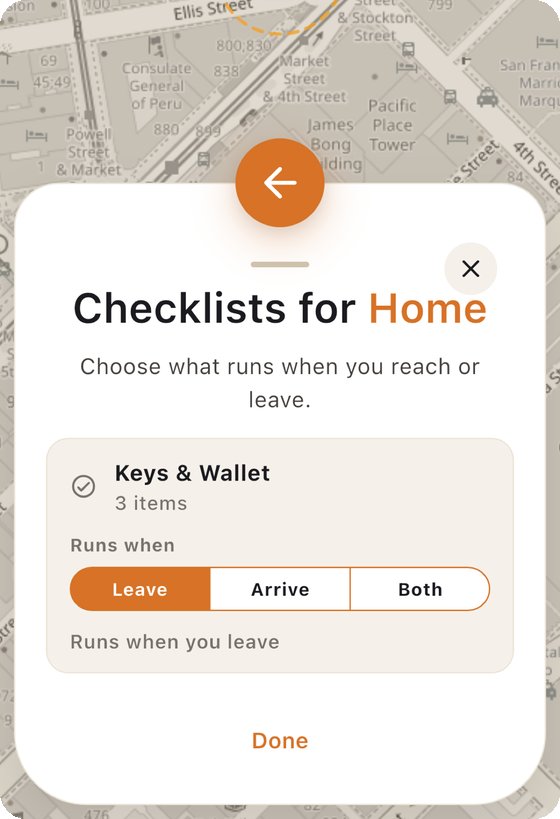
That's the gap Reembr is built for. You save a place, attach a short checklist, and choose whether it runs when you leave, arrive, or both. It runs every time, not once.
If you're also setting this up on an iPhone, Apple Reminders still supports location reminders natively. The steps are in our guide to setting a location-based reminder on iPhone and Android.
Quick answers
Did Google remove location reminders from Google Keep?
Yes. When Keep's reminders moved into Google Tasks, starting in October 2025 and reaching all accounts by January 2026, the option to set a reminder for a place went away. Google Tasks only supports date and time reminders, so there is nothing to trigger a place-based alert.
Does Google Tasks have location reminders?
No. Google Tasks reminders are based on dates and times only. If a migrated Keep reminder had a place, the place name was copied into the task's description as plain text, and it won't send a notification when you get there.
How do I get location reminders on Android now?
On a Samsung Galaxy phone, the built-in Reminder app can alert you when you arrive at or leave a place. On any other Android phone you need a third-party app with location reminders. Whichever you use, allow location access all the time and set the app's battery use to Unrestricted.